Complementary Usage
So far, we have talked about visual scripting driving the logic of a pinball game. But what if we need to add logic to an existing gamelogic engine, without replacing it entirely?
For example, Rock (Premier 1978) isn't entirely emulated in PinMAME; the start-up light sequence is handled by an auxiliary board, and we're only getting control signals, but not signals for every individual light.
In this case, we'd like to keep PinMAME as the driving GLE, but add a visual script that handles the light sequence properly.
Setup
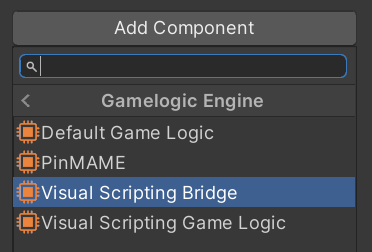
In order to give VPE's visual scripting nodes access to your game logic engine, we provide what we call a Visual Scripting Bridge. It's a component that you'll need to add to your table's game object, along with your original gamelogic engine. You can do that by selecting the game object, clicking Add Component in the inspector, and choosing Pinball -> Gamelogic Engine -> Visual Scripting Game Logic.
This will give you access to most of the nodes. For example, the On Lamp Changed event will now be triggered by whatever other gamelogic engine you're using.
Nodes
There are a few nodes you cannot rely on because they need the visual scripting gamelogic engine and won't work with the bridge. These nodes currently are:
- The display node
- The variable nodes
All other nodes (coils, switches, lamps and events) are available for use.